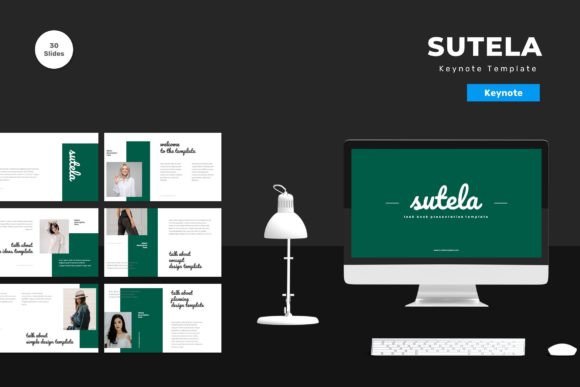
Sutela Keynote Template: A Versatile Design Tool
In the fast-paced world of digital communication, the ability to convey ideas clearly and visually is paramount. Whether you are pitching a startup concept, teaching a university lecture, or sharing a personal portfolio, the medium through which you present your information matters just as much as the content itself. This is where Sutela - Keynote Template enters the conversation. It is not merely a collection of slides; it is a structured design system built for Apple’s Keynote application, designed to streamline the creation process while maintaining a high standard of aesthetic professionalism.
Understanding what this template offers requires looking beyond the surface-level graphics. At its core, Sutela provides a framework of 150 total slides, organized across five premade color schemes. For many users, the sheer volume of options can be overwhelming, but for others, it represents a necessary library of resources that eliminates the need to start from scratch. The template is vector-based, meaning every element scales without losing quality, and it relies on master slides to ensure consistency throughout your presentation. These technical details might seem minor to a casual observer, but they are critical for anyone who values efficiency and brand integrity.
Why Different Audiences Value Flexibility
The utility of a presentation template varies significantly depending on who is holding the mouse. For a marketing professional, time is often the scarcest resource. They may need to produce a quarterly report or a client pitch deck under tight deadlines. For this group, the "drag and drop" functionality of Sutela is not just a convenience; it is a workflow saver. The ability to replace placeholder images and input content directly into pre-formatted text boxes allows marketers to focus on their message rather than wrestling with alignment tools or font pairings. The inclusion of animated slides adds a layer of dynamism that can help retain audience attention during dense data presentations.
Conversely, an educator or academic might prioritize clarity and structure over flashy animations. For teachers, the 30 useful slide types included in the package offer a variety of layouts for listing concepts, comparing theories, or displaying timelines. The fact that all elements are editable means an educator can strip away unnecessary decorative elements to create a clean, distraction-free learning environment. The recommendation of free web fonts ensures that the presentation remains accessible and consistent, even if shared across different devices or operating systems where specific proprietary fonts might not be installed.
Creativity Meets Practicality for Entrepreneurs
Entrepreneurs and small business owners often wear multiple hats, including that of the chief designer. Without a dedicated graphic design team, they rely on tools that bridge the gap between amateur effort and professional output. Sutela addresses this by offering five premade colors, which serve as a starting point for brand alignment. While the preview images are not included in the download, the structure allows users to insert their own branding assets seamlessly. This flexibility is crucial for startups that are still defining their visual identity but need to present a polished face to investors or partners.
The template’s reliance on master slides is particularly beneficial for this group. Master slides allow for global changes; if a business decides to shift its primary color from blue to green, it can be done efficiently without manually adjusting every single slide. This long-term usefulness reduces the friction of updating materials as the business evolves. Furthermore, the widescreen format ensures compatibility with modern projectors and monitors, avoiding the awkward black bars associated with older aspect ratios.
Ease of Use for Beginners and Hobbyists
For beginners, hobbyists, or individuals creating personal presentations—such as wedding slideshows or travel journals—the learning curve of professional design software can be a barrier. Sutela lowers this barrier by emphasizing ease of use. The "Readme First" file included in the package is a small but significant detail. It guides users through the setup process, explaining how to manage the vector elements and how to best utilize the drag-and-drop features. This supportive structure empowers non-designers to create visuals that look intentional and curated rather than haphazard.
Hobbyists who enjoy digital scrapbooking or creative storytelling will appreciate the vector-based nature of the graphics. Because the elements are scalable, they can be resized for dramatic effect without pixelation. This opens up creative possibilities for those who want to experiment with layout and composition without needing advanced technical skills. The template acts as a sandbox where users can safely explore design principles like balance, contrast, and hierarchy.
Evaluating the Technical Specifications
When considering whether Sutela fits your needs, it is important to look at the technical specifications objectively. The package includes five Keynote files, each corresponding to one of the premade color schemes. This separation keeps file sizes manageable and prevents clutter. However, users should note that the template is designed specifically for Keynote. Those deeply embedded in the Microsoft PowerPoint ecosystem may find the transition challenging, although Keynote files can often be exported to other formats with varying degrees of fidelity.
The emphasis on free web fonts is a strategic choice that enhances collaboration. When sharing presentations with team members or clients, font compatibility issues are a common source of frustration. By sticking to widely available fonts, Sutela ensures that the visual integrity of the presentation is preserved regardless of who opens the file. This reliability is a key factor for professionals who collaborate remotely or share decks with external stakeholders.
Making the Right Choice for Your Project
Ultimately, the decision to use Sutela - Keynote Template depends on your specific goals and constraints. If you value speed and need a comprehensive library of slide layouts that cover most business and personal scenarios, this template offers substantial value. The 150 slides provide enough variety to handle complex narratives, from introduction and agenda slides to detailed data visualization and concluding calls to action.
However, if your project requires highly customized, bespoke illustrations or a unique artistic direction that deviates significantly from clean, modern minimalism, you may find the premade structures limiting. In such cases, the template serves better as a foundation to be heavily modified rather than a final solution. It is essential to assess whether the five premade colors align with your existing brand guidelines or personal aesthetic preferences. If they do, the time saved in setup and formatting can be redirected toward refining your content and delivery.
For freelancers and publishers, the commercial value lies in the reusability of the asset. Once purchased, the template can be adapted for multiple clients or projects, provided the licensing terms allow for it. This makes it a cost-effective investment for those who produce presentations regularly. The ability to quickly swap out images and text while maintaining a cohesive look helps freelancers deliver consistent quality across diverse projects.
In conclusion, Sutela - Keynote Template is a practical tool for a wide range of users. It balances aesthetic appeal with functional flexibility, catering to both the novice who needs guidance and the expert who needs efficiency. By understanding your own priorities—whether they are ease of use, creative freedom, or professional polish—you can determine if this template aligns with your presentation strategy. The key is to view it not just as a set of slides, but as a system that supports your communication goals, allowing your ideas to take center stage.